Posts

Zend Studio 5.5 Blank Main Window

After installing Zend Studio 5.5 bin files, when I start the Zend it displays blank window (Gray Colored). I googled it out and found that, the issue lies with some form of Java incompatibility. To Solve the issue, Open the ZDE files placed inside Application root (your home directory Path/Zend/ZendStudio-5.5.0/bin). On line 1694 you will find below code, debugOut "" unset POSIXLY_CORRECT Add options="$options -Dawt.toolkit=sun.awt.motif.MToolkit" on line 1693. So your edited file will be looked like this. options="$options -Dawt.toolkit=sun.awt.motif.MToolkit" debugOut "" unset POSIXLY_CORRECT Your problem will be resolved.  
Resolve: Failed to access IIS metabase

After setting up IIS and ASP .Net, if you get error as below. Failed to access IIS metabase, when trying to browse to .NET 2.0 Website To solve the issue try below command, C:\WINDOWS\Microsoft.NET\Framework\v2.0.50727>aspnet_regiis -i That might solve your problem. Good Luck !

Most Popular Programming Languages

Most Popular Programming Languages Posted using ShareThis

Reality

Reality is what we take to be true. What we take to be true is what we believe. What we believe is based upon our perceptions. What we perceive depends upon what we look for. What we look for depends upon what we think. What we think depends upon what we perceive. What we perceive determines what we believe. What we believe determines what we take to be true. what we take to be true is our reality.  -- Gary Zukav (American best selling author)

Reinstall GRUB using Ubuntu Live CD

Few days back I installed Ubuntu on Machine which already had Windows installed. Yes your guess is correct thats basically "Dual boot". The issue I had faced was on machine startup it starts Windows only and not been able to access Ubuntu, which was installed correctly. I searched many forums and articles, then I came to know about re-installation of GRUB  GRUB is a GRand Unified Bootloader. For more info, Please Visit:  http://www.gnu.org/software/grub/ . So I thought I should share the info with all.  Below are the steps required to perform. 1. Boot into the Live Ubuntu 9.04 CD 2. Open Terminal  3. Type command:  sudo grub [This will give you grub> prompt/shell] 4. On Grub Prompt Type below commands on by one. find /boot/grub/stage1  [This will give you the location as result. In my case the location was (hd1,2)] root (hd?,?) [? = the values returned to you as result of above command] setup (hd?) quit That i...

Happy International Women's Day!

Happy International Women's Day! All of you wonderful women inspire me so much.

Happy Birthday to Ahmedabad - 600th Year

Image
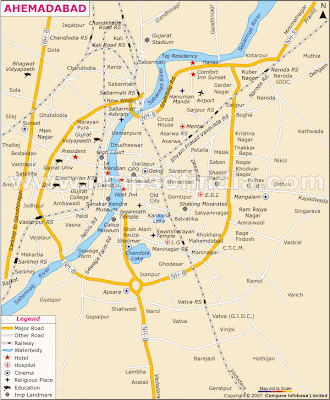
Ahmedabad is celebrating its 600 Year. Map From :  http://www.mapsofindia.com/

Google truly no. 1

Image
Makarsankranti or Uttarayan  Logo from Google. Courtesy: Google

Aman Ki Asha - A Indo Pak Peace Project

Aman Ki Asha is a brave, new people-to-people initiative by The Times of India and Pakistan's Jang Group to bring the people of two fine nations closer together. Culturally, emotionally and peacefully. Courtesy: Time of India, YouTube

GL Covered in Divyabhasker Flashback 2009 Supplement

Image
Divyabhasker Flashback 2009 supplement featured GL in its Best of Showcase. View online from here Courtesy: Divyabhaskar

Odd behavior of Firefox Browser or Gmail

Image
Today when I login to Gmail, it display everything fine. All of sudden I got below screen. Refresh does not solve issue. I have to logout and again login solves the issue.

Install Chromium Web Browser Ubuntu 9.10 (Karmic Koala)

Open Terminal, Type below command, sudo apt-key adv --recv-keys --keyserver keyserver.ubuntu.com 4E5E17B5 Go To System ->Administrator -> Software Sources Select Other Software Tab Click Add Button Type below command, deb http://ppa.launchpad.net/chromium-daily/ppa/ubuntu karmic main Click Add Source Now Click Reload Button In Terminal Type below command, sudo apt-get update && sudo apt-get install chromium-browser You will find Chromium Web Browser installed in Application -> Internet -> Chromium Web Browser .

Upgrade to Ubuntu 9.04 (Jaunty Jackalope) to 9.10 (Karmic Koala)

I have upgrade my machine to Ubuntu 9.04 (Jaunty Jackalope) to 9.10 (Karmic Koala). To upgrade Go to System -> Administrator -> Update Manager Now Click on Upgrade button to start upgrade process. After few hours you will be having ubuntu 9.10 on your machine. Lets Experience ! Enjoy !

Go - New Programming Language by Google

Google has announced the release of a new, open sourced programming language called Go. The company says that Go is experimental, and that it combines the performance and security benefits associated with using a compiled language like C++ with the speed of a dynamic language like Python. Google says, Go is .... … simple … fast … safe … concurrent … fun … open source Visit Go's official site for more info.

Set/Change/Reset Mysql Root Password on Ubuntu 9.04 (Jaunty)

Few days back I had issue with MySQL Root password on Ubuntu 9.04 (Jaunty). I was able to reset the password with following commands on terminal. 1. Stop the MySQL Server. sudo /etc/init.d/mysql stop 2. Start the mysqld configuration. sudo mysqld --skip-grant-tables & 3. Login to MySQL as root. mysql -u root mysql 4. Replace YOURNEWPASSWORD with your new password! UPDATE user SET Password=PASSWORD('YOURNEWPASSWORD') WHERE User='root'; FLUSH PRIVILEGES; exit;

Doodle for Google

Doodle 4 Google is a competition where Google invites students to reinvent Google's homepage logo. Both the countries and world are undergoing significant change and this year Google invited students to doodle around the theme "What I Wish for the World". You can get more details about on its site. http://www.google.com/doodle4google/

Times Of India Coverage

Image
Girl power puts Gujarati lexicon at your fingertips by Ashish Vashi | TNN Ahmedabad: If the online Gujarati lexicon has proved to be a boon for translators or writers, a bunch of five 20-something girls ought to take the credit. Their love for their mother tongue is phenomenal and so is their passion for language. Hence, with the help of technology they have made words available at fingertips for Gujaratis. Sumaiya Vohra, Padma Javad, Maitri Shah, Shruti Amin and Deval Vyas run an IT firm which handles jobs of researching and compiling Gujarati words. After digitizing ‘Bhagwadgomandal’—a major dictionary of Gujarati—their recent achievement was to put ‘lokkosh’, a Gujarati lexicon, online. It has been accessible to netizens from Tuesday. “Before this company, we were working at different places. We share the same wavelength and passion for Gujarati language. At present, there are various projects in our kitty, including a major one for creating a good spell-check software for Gujarati ...

Lokkosh - Bhasha Ni Asha is LIVE!

Image
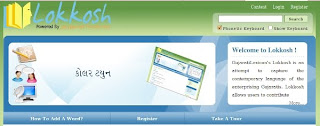
Lokksoh - Bhasha Ni Asha project is LIVE now! A resource for the people, by the people and of the people. To capture the new words which are globally accepted in Gujarati language day to day life but not exist in Gujarati dictionaries like Sarth, Bruhad and Bhagwadgomandal . People participation is must as " Lokkosh " project is for Gujarati Language Lovers. Courtesy: Lokkosh - Powered by GujaratiLexicon Do visit once!

Drupal: Internal Server Error

While restoring the Drupal Project, Index page was displayed properly. Issue I had encountered was "Internal Server error" on clicking any link given on index page. That was issue because Clean URL was enabled and .htaccess missing the argument. To resolve the issue. Just add argument in the .htaccess file containing your rewrite rules, after RewriteEngine on, add RewriteBase /. Example: RewriteEngine on RewriteBase / This will resolve the issue if clean URL is enabled.

Bhavadgomandal

Bhagvadgomandal is the biggest and the most prolific work in Gujarati. Visionary Maharaj Bhagvadsinhji of Gondal gifted the original Bhagvadgomandal to the world after 26 years of scientific and detailed work. This encyclopedic dictionary is a cultural milestone of Gujarati language. Ratilal Chandaria's Gujaratilexicon Team has digitized Bhagvadgomandal and created its digital avatar. The aim is to showcase the richness of such an indispensable resource for experts and lovers of Gujarati language. It is a treasure of knowledge and every Gujarati's pride. Explore It! CREDITS: http://www.bhagvadgomandal.com http://www.gujaratilexicon.com